
Windows 11 Fans Celebrate as Microsoft Brings Back Taskbar Placement Features

We independently review everything we recommend. When you buy through our links, we may earn a commission which is paid directly to our Australia-based writers, editors, and support staff. Thank you for your support!
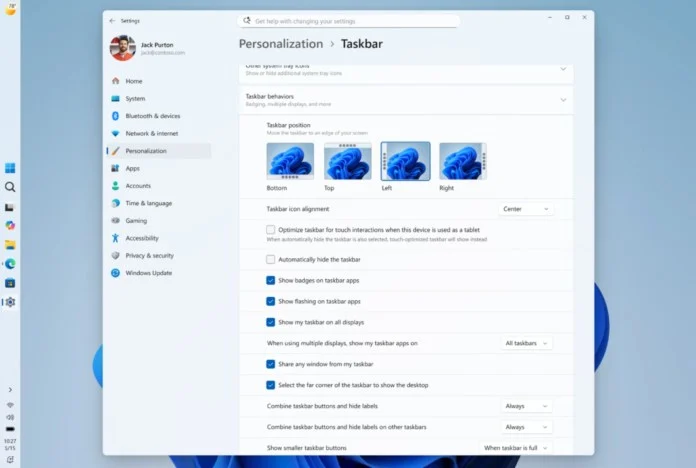
Brief Overview
- Microsoft brings back taskbar positioning options in Windows 11.
- Taskbar now adjustable to the top, left, or right side.
- New customization features for icon placements and menu alignments.
- Launch of a compact taskbar for better screen utilization.
- Taskbar modifications consider the placements of Start and Search flyouts.
- Start menu redesign minimizes clutter and enhances relevance.
- Update prompted by user input for a more tailored experience.
Taskbar Positioning is Back
In a development likely to please customization fans, Microsoft has revealed the reinstatement of taskbar positioning options in Windows 11. This enhancement, available to Windows Insider participants, permits users to position the taskbar at the top, bottom, left, or right of their displays.
Customisation Beyond Positioning
Users now not only have the ability to relocate the taskbar but also to select icon alignments for each placement. This promotes a more deliberate and unified user interface. The alignments for Start and Search flyouts now correspond with the taskbar’s position for a fluid experience.
Compact Taskbar for Smaller Displays
Responding to input regarding the taskbar’s dimensions, Microsoft has reintroduced the “small taskbar” option. Users can now select smaller icons and a compact bar, improving usability on devices with less screen space.
Streamlining the Start Menu
The Start menu is also experiencing updates aimed at decluttering. The “Recommended” area has been renamed to “Recent,” centering on frequently used apps and files. Users are able to customize the items displayed in the Start menu, creating a tidier, more tailored experience.
Dedication to User Input
This update epitomizes Microsoft’s commitment to heeding user feedback. By tackling enduring requests, Microsoft is rebuilding trust with its users and demonstrating its dedication to a user-centered operating system.
Technical Constraints and Upcoming Developments
While the taskbar positioning feature has returned, certain functionalities such as auto-hide and drag-and-drop remain in development. Microsoft is actively refining these components as the update advances through Insider channels.
How to Access the Update Immediately
To explore the new taskbar features, users can enroll in the Windows Insider Program. However, the Experimental channel may not be ideal for everyday use. The official update will soon become accessible to all users in Australia, re-establishing Windows as a more personalized experience.
Conclusion
Microsoft’s initiative to restore taskbar positioning options in Windows 11 is a considerable advancement towards a more individualized and user-friendly operating system. With improved customization capabilities and a more streamlined Start menu, this update responds to user feedback and prepares for prospective enhancements.
Reader questions
Frequently asked questions
Fast answers to the questions readers ask most about Windows 11 Fans Celebrate as Microsoft Brings Back Taskbar Placement Features.
What taskbar positioning options are currently available in Windows 11?
Users can set the taskbar at the top, bottom, left, or right of their displays.
What customization features are part of the update?
Users can select icon alignment for the taskbar positions and adjust the Start and Search flyouts to align with the taskbar’s placement.
How does the smaller taskbar benefit users?
The smaller taskbar, featuring reduced icon sizes, optimizes screen usage, particularly on devices with restricted display areas.
What changes have been implemented in the Start menu?
The Start menu now allows users to customize visible segments, with the “Recommended” section renamed to “Recent” for enhanced relevance.
Is this update accessible to all Windows 11 users?
Presently, the update is available via the Windows Insider Program’s Experimental channel, but it will soon be extended to all users in Australia.
Are there any technical constraints associated with the new taskbar features?
Some features, such as auto-hide and drag-and-drop, are still in development and not entirely functional with the new taskbar setups.
