
Microsoft Evaluates Automatic Device Isolation in Defender for Endpoint

We independently review everything we recommend. When you buy through our links, we may earn a commission which is paid directly to our Australia-based writers, editors, and support staff. Thank you for your support!
Overview
- Microsoft showcases automatic device isolation in Defender for Endpoint.
- This feature is intended to improve response capabilities to ransomware and other threats.
- Automatic isolation is temporary and is lifted after the incident is resolved.
- Manual isolation has been part of the Windows 10 Creators Update since its release.
- New features are also previewed for Defender on Linux.
- Google and Microsoft incorporate similar containment features into cloud storage solutions.
A New Security Approach: Automatic Device Isolation
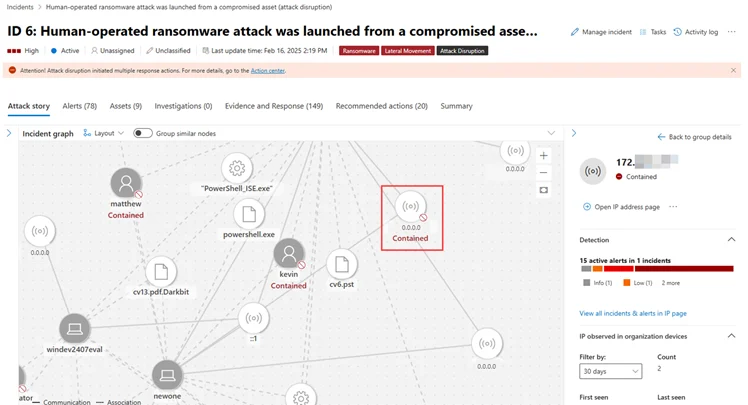
Microsoft has made a notable advancement in cybersecurity with the introduction of a preview for automatic device isolation within its Defender for Endpoint platform. This enhancement is part of a larger strategy focused on improving enterprise security by automatically disrupting attacks like ransomware, reducing the need for immediate human intervention.
Functionality
The automatic isolation feature activates during a security event, disconnecting affected devices from the network. This isolation is provisional and is lifted after a predetermined duration unless security teams opt to conclude it sooner following a thorough investigation and remediation. Even while isolated, devices continue to communicate with Defender for Endpoint, ensuring ongoing monitoring and data gathering.
Comparison of Manual and Automatic Isolation
Manual device isolation has been an essential part of Defender for Endpoint since the Windows 10 Creators Update, while the automatic option allows for quicker responses to burgeoning threats. This new functionality supports both managed and unmanaged devices, with recent advancements to encompass macOS and Linux platforms as of October 2023.
User Notifications
Windows users receive alerts when their devices undergo isolation, a capability that has yet to be implemented for macOS and Linux users. This difference underscores the continuous effort to develop cross-platform functionality for Defender for Endpoint.
Expanded Security Features
In addition to device isolation, Microsoft is trialing scheduled scanning features for Linux, which complement similar functionalities on macOS. These updates exemplify Microsoft’s commitment to delivering thorough security solutions across diverse operating systems.
Containment in Cloud Storage
In addition to device isolation, both Microsoft and Google are fortifying their cloud storage security through containment strategies for OneDrive and Google Drive. OneDrive emphasizes ransomware detection and recovery, while Google Drive enhances security by pausing sync processes upon detecting ransomware.
Current Availability and Target Audience
The automatic device isolation functionality is presently available for preview on Defender for Endpoint Plan 2, aimed at enterprise clients looking for advanced security options to safeguard their networks.
Conclusion
Microsoft’s recent update to Defender for Endpoint demonstrates their commitment to proactive security measures. The introduction of automatic device isolation promises expedited incident response, improved network security, and enhanced control for enterprises navigating the intricate landscape of cybersecurity threats.
Reader questions
Frequently asked questions
Fast answers to the questions readers ask most about Microsoft Evaluates Automatic Device Isolation in Defender for Endpoint.
What is the primary goal of automatic device isolation?
The primary goal is to swiftly contain threats like ransomware, halting their spread across networks while allowing time for human responders to investigate and remediate.
In what ways does automatic device isolation differ from manual isolation?
Automatic isolation is initiated automatically during incidents and is lifted after a designated period, while manual isolation necessitates direct action from security personnel.
Is automatic device isolation applicable to all devices?
Currently, it is applicable to devices managed by Defender for Endpoint, with previews available for unmanaged devices and expanded support for operating systems like macOS and Linux.
Will users be aware when their device is isolated?
Windows users receive notifications when their device is isolated; however, this feature is not yet available for macOS and Linux users.
What other features are being evaluated on Defender for Endpoint?
Microsoft is evaluating scheduled scans for Linux, which are already available on macOS, as part of the ongoing improvement of their security platform.
How does cloud storage containment function for OneDrive and Google Drive?
OneDrive focuses on identifying ransomware and assisting recovery, while Google Drive also suspends sync operations to prevent the proliferation of encrypted files.
