
Review: Epomaker QK108 – An Ideal Full-Size Mechanical Keyboard for Australian Developers Who Enjoy Experimenting

We independently review everything we recommend. When you buy through our links, we may earn a commission which is paid directly to our Australia-based writers, editors, and support staff. Thank you for your support!
Brief Overview
- The Epomaker QK108 represents a full-sized mechanical keyboard perfect for developers and hobbyists.
- It boasts a detachable cable, RGB illumination, and a programmable knob.
- Features hot-swappable switches and accommodates both wired and wireless connectivity.
- Customization capabilities include VIA and QMK support for key remapping.
- The keyboard is equipped with a custom LCD display for enhanced personalization.
Full-sized and unapologetic
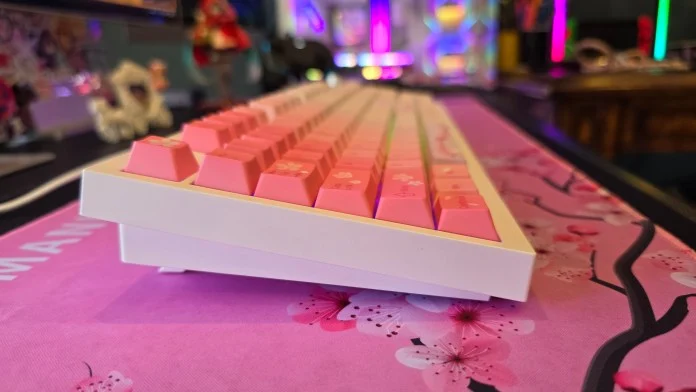
The Epomaker QK108 showcases a complete 104-key layout, including a function row, navigation keys, arrow cluster, and numpad. This extensive setup is ideal for users who frequently switch between applications. The stepped design of the keyboard combined with adjustable feet provides ergonomic comfort tailored to user preferences.
The necessity of detachable cables
The Epomaker QK108 is equipped with a detachable USB-A to USB-C cable, facilitating connectivity among various devices. While it can connect via Bluetooth and 2.4GHz wireless methods, the wired alternative provides superior responsiveness, addressing any latency issues.
Quiet, soft, and unexpectedly pleasant with hot-swappable switches
This keyboard is fitted with silent switches, ensuring a soft and cushioned typing experience. The hot-swappable functionality allows users to change switches easily, granting the freedom to try different switch types without soldering.
The LCD display is a fun addition… and I enjoy it
This keyboard comprises a custom LCD display that can show the time and personalized GIFs, improving user engagement. The web-based image tool allows for straightforward setup without the need for software installation.
A volume knob that genuinely adds value
The programmable knob offers practical physical volume control, a feature you’ll miss once you experience it. It effortlessly adjusts volume and mutes or unmutes sound as needed.
A keyboard built for developers
The Epomaker QK108 supports VIA and QMK, allowing for comprehensive key remapping and custom layer development. While setup requires some additional steps, the potential for customization is extensive, making it a favorable choice for developers.
RGB without the software complexity
The RGB lighting of the keyboard can be adjusted using onboard shortcuts, negating the necessity for software installation. While VIA software provides more options, users can simply change brightness, colors, and effects directly through the keyboard.
- Fn + |: cycle through backlight colors/effects
- Fn + Up Arrow: Increase backlight brightness
- Fn + Down Arrow: Decrease backlight brightness
- Fn + -_: Reduce backlight effect speed
- Fn + =+: Increase backlight effect speed
Conclusion
The Epomaker QK108 is a multifunctional mechanical keyboard tailored for individuals who value total customization and quality attributes. Priced at $89.99 USD ($128.24 AUD) directly from Epomaker, it provides an enjoyable typing experience, extensive customization options, and distinctive features like an LCD screen and programmable knob. Whether you are a developer or someone who enjoys tinkering with devices, this keyboard presents a strong option.
Reader questions
Frequently asked questions
Fast answers to the questions readers ask most about Review: Epomaker QK108 – An Ideal Full-Size Mechanical Keyboard for Australian Developers Who Enjoy Experimenting.
What are the key specifications of the Epomaker QK108?
The Epomaker QK108 features a full-size layout, detachable cable, RGB lighting, hot-swappable switches, a custom LCD screen, and a programmable knob.
Is the keyboard capable of wireless operation?
Yes, it supports Bluetooth and 2.4GHz wireless connectivity, although a wired connection is suggested for optimal performance.
Is the keyboard suitable for developers?
Indeed. The QK108 is compatible with VIA and QMK, providing extensive key remapping and custom layer creation capabilities, making it perfect for developers.
How does the LCD screen enhance the keyboard's functionality?
The LCD screen can show the time and custom GIFs, offering further personalization options and elevating user interaction.
Is software installation necessary for customization?
Basic customization does not require software installation. However, VIA software offers opportunities for more advanced configurations.
